Remote Control Guide
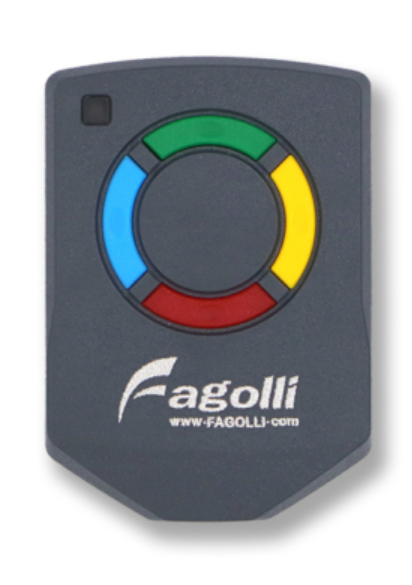
Motor Direction
Left: Leftside when looking out from inside the house
Right: Rightside when looking out from inside the house
General Control
- Green: Open Both Gates
- Blue: Open Left Gate
- Yellow: Open Right Gate
- Red:
- Stop Both Gates (While opening)
- Close Both Gates (While opened)
- *No response when gate is closing
Auxilary Control
- Green + Yellow: Auto Close Settings
- Siren Beep Once: Auto close 1 minute
- Siren Beep Twice: Auto close 2 minute
- Siren Long Beep: Auto close deactivated
- *Auto close can only be set when the gate is closed + safety beam is not blocking and enabled
- Red + Yellow: Panic alarm
- Alarm will sound for 3 minutes
- Press any other button will turn off the alarm
- Blue + Red: Motion Alert
- Siren Beep Once: Gate motion alert active
- Siren Beep Twice: Gate motion alert active + Intruder alarm armed
- Siren Long Beep: Gate motion alert deactivated + Intruder alarm disarmed
- *Motion alert can only be set when the gate is closed
- *Intruder alarm can only be set when the gate is closed + safety beam is not blocking and enabled
- Blue Long Pressed: Force Close Left Gate
- *Only possible when left gate is fully opened
- Yellow Long Pressed: Force Close Right Gate
- *Only possible when right gate is fully opened
- Red Long Pressed: Close Both Gate
- *Only possible when safety beam is not blocking and enabled
Notes:
Siren Beep will also translate to a clicking noise on the right side of the motor
- Beep Once: Click once
- Beep Twice: Click twice
- Long Beep: Click thrice (3 times)
Remote Settings
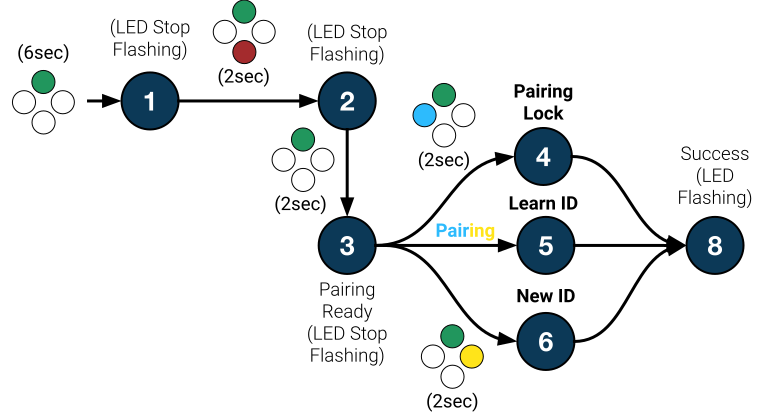
By flowing the flow chart below you can perform:
- Remote pairing from another remote
- Pairing Lock (Anti-clone): Disable pairing ability to another target remote
- New ID: Reset remote
Remote Pairing
- Copying from a source remote to a target remote.
- Follow the flow chart above from step
1>2>3>5>8for the target remote. - At step
3, place the source remote on top of the target remote and press Blue and Yellow buttons on the source remote while maintaining pressing the Green button on the target remote.
Motor Pairing
Notes
- All remotes share the same ID, motor can only learn a single ID
Perform Remote Pairing to copy the ID from an existing remote - There's a pairing window when device first bootup, pairing can't be done after the window. Please reboot the device to re-enable the pairing
Before Starting
Place remote ontop of the motor LED
Ensure the center of the remote is convering the LED
(Remove motor outer weatherproof housing if installed)
Reset / Pair Motor
Notes:
Pairing or re-pairing a new remote to the motor will also reset all device settings
- Such as:
- Safety Beam Settings
- Gate position
- Swing gate preference
- Blue: Pair Left Motor
- Will re-enabled the safety beam
- *Motor triple click means success
- Yellow: Pair Right Motor
- Will re-enabled the safety beam
- *Motor triple click means success
Extra Settings
- Red: Disable Safety Beam
- Required to be done on both sides
- *Motor double click means success
- Green + Blue: Swing Gate (Outer Flap on Left)
- Required to be done on both sides
- *Motor quadruple click means success
- Green + Yellow: Swing Gate (Outer Flap on Right)
- Required to be done on both sides
- *Motor quadruple click means success